

Moving Legacy Data into Benchling Without Losing Scientific Context

.png)
.png)
The Involve Data Difference Part 2
How Involve Data preserves scientific context and prepares legacy data for analysis and AI
This is Part 2 of our four-part series on maximizing the value of your Benchling implementation. In Part 1, we explored how the defined data model supports scientific work, analysis, and AI. Here, we look at migrating legacy data into that model while preserving its meaning and relationships.
When a scientist revisits an old assay, they need to know which material and lot were tested, which method was used, and where to find the supporting files. Moving that work from another electronic lab notebook (ELN) into Benchling needs to preserve both the data and associated files to retain the scientific history.
The data model from Part 1 gives that work a starting point. At Involve Data, we work with the client's subject matter experts to establish context: what each record means, how it connects to other records, and where it belongs in Benchling.
Establish Scientific Owners for legacy data
We work together with the client to name a scientific owner for each main type of data, including entities, materials, protocols, and assay results. The same scientist may own several data types, depending on their expertise. Together, we review representative source records against the data model from Part 1. These owners help decide which fields matter, how records map to the model, and what criteria must be met to achieve a successful migration. The migration path for each type of data can only be determined after first defining the end goal.
The migration scope is defined to identify which notebook entries and structured records will be moved, which will remain accessible in an archive, and who will verify each group. Working with the people responsible for retaining the records, we agree how original authorship, dates, signatures, and audit history will remain accessible.
Destinations for Each Type of Benchling Record
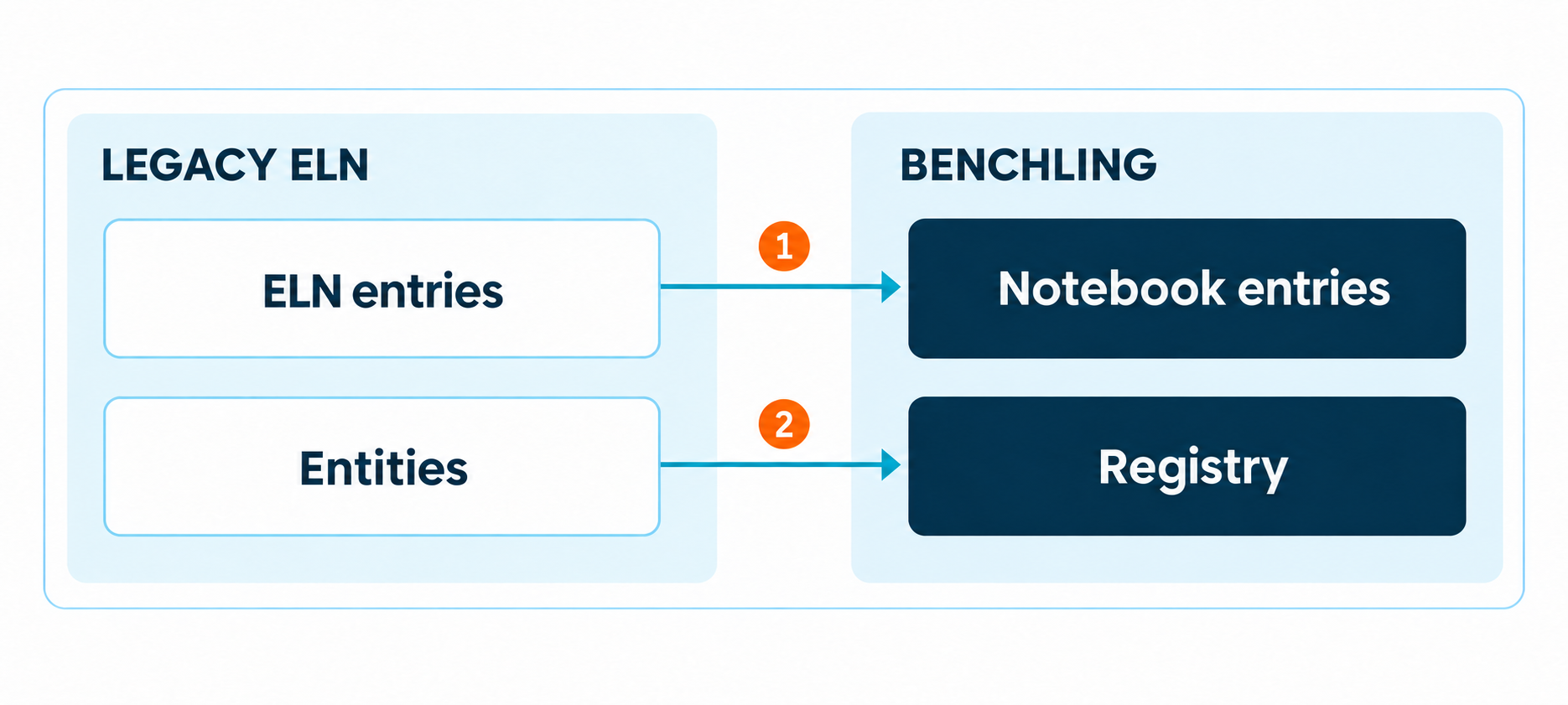
Historical experiments span several connected parts of Benchling. Each needs an agreed-upon destination and a way to connect it to the rest of the work.
Entities and lots. Registry entities describe materials such as proteins, sequences, or cell lines. Lots and preparations can be modeled as child entities linked to parent material. The migration must preserve these identities, historic names, lot-specific attributes, and relationships.
Containers. Inventory tracks physical vessels and wells, their contents, locations, quantities, and concentrations. A lot may occupy several containers. We load material and lot records before dependent container data or use a combined import which creates and connects them.
Results. Results capture experimental assay measurements in fields defined by Result schemas and link them to relevant entities or containers. To prep for Results migration, we map the values, units, assay context, and supporting references. Due to data linkage requirements, this step must occur after the migration of entity and lot records to which the Results apply.
Notebook entries. Entries hold the experimental narrative, procedures, scientific context, observations, and supporting files. The team must decide separately which tables to reconstruct as structured data and where non-PDF attachments will live. We retain the original notebook entry as an attached .pdf for governance purposes and indexing and search via Benchling AI. Finally, we document how scientists will find any files retained in an archive.
Mapping Scientific Meaning and Relationships
We establish what each source identifier means before mapping it. We frequently work through duplicate names, missing values, inconsistent units, and references buried in free text with the scientific domain owner. A source-to-Benchling identifier map lets the team trace each migrated record and reconnect related data.
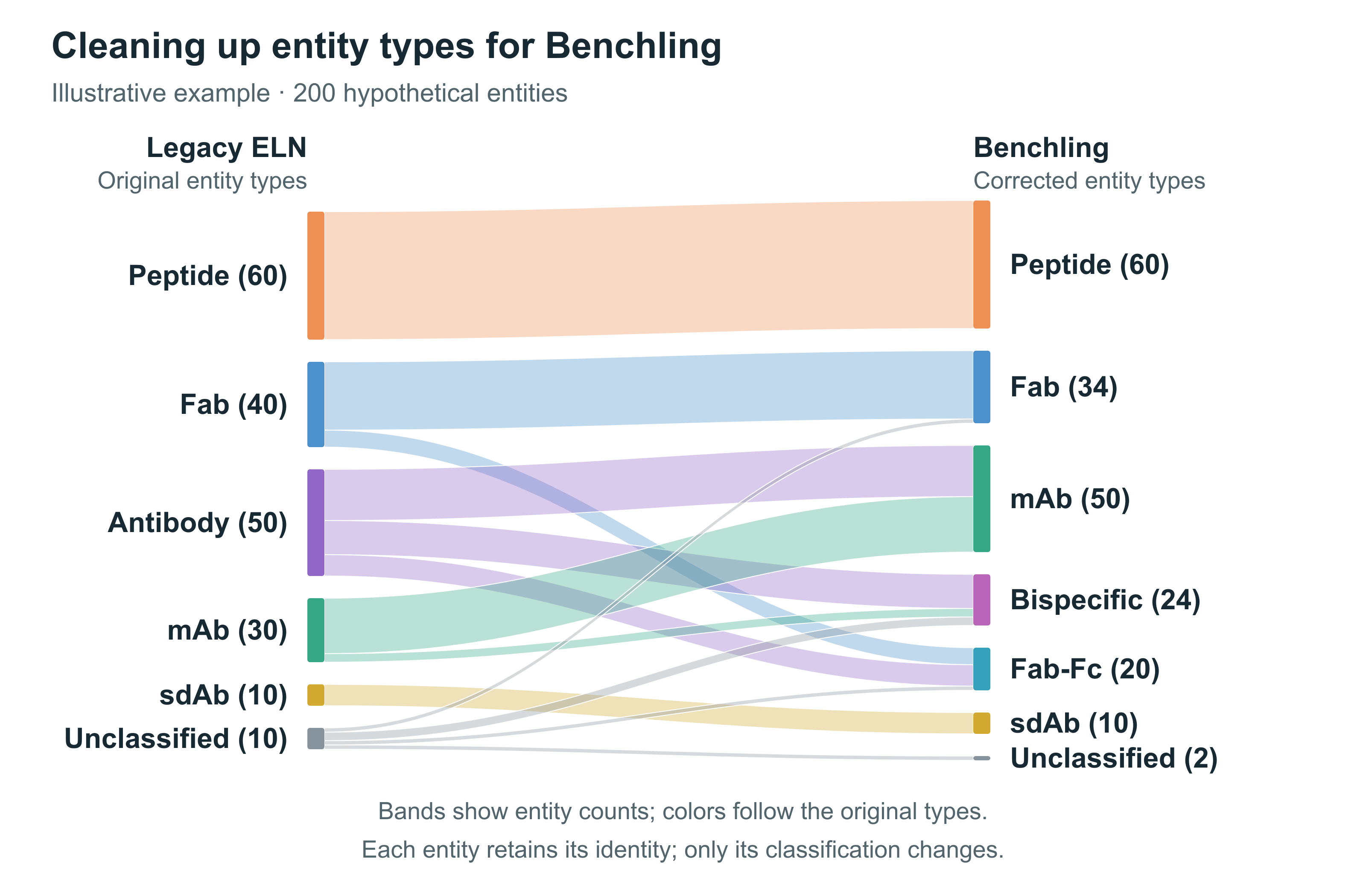
Frequently, legacy entity types need to be corrected before transition. This is also an opportunity to leverage Benchling entities to add more definition and metadata to entities. In the Sankey chart example below, entities labeled Antibody are reassigned to defined molecular formats. Each entity keeps its identity as its classification is cleaned up.
Explicit and Repeatable Conversion Rules
A modified DNA or RNA oligonucleotide may be written in local shorthand that encodes its bases and chemical modifications. We work with scientific owners to define how that notation maps to Benchling’s configured monomer library and supported sequence formats, preserving both the nucleotide sequence and its chemistry. We document these conversion rules alongside naming conventions and the relationships each entity needs to retain.
Migration Tools Built Around the Benchling API
At Involve Data, we can build migration tools that connect a legacy ELN or data management system to Benchling. These tools turn approved mapping rules into a repeatable process, reducing manual re-entry and making each transfer easier to verify.
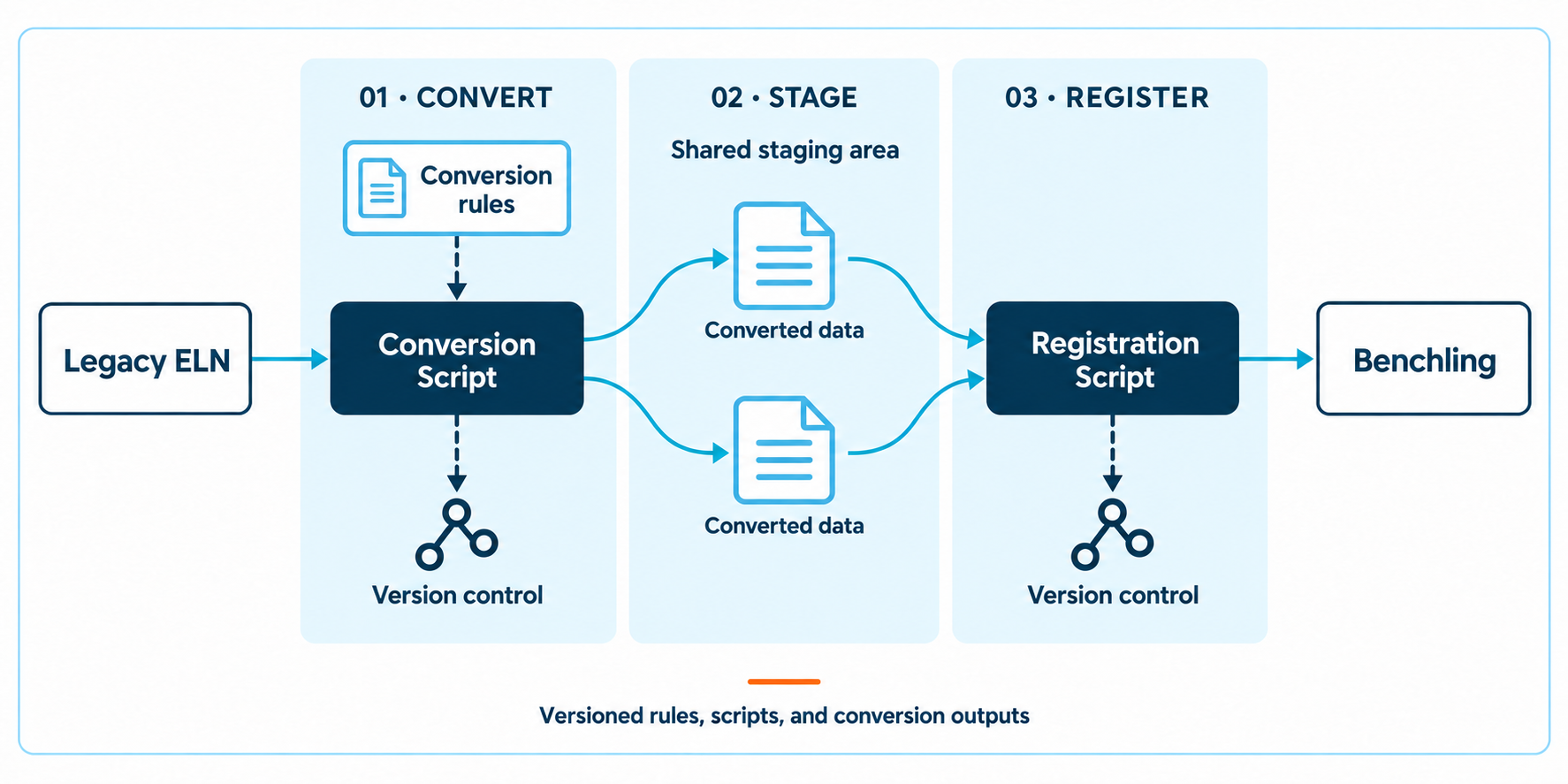
Extract the source data. A data-extraction tool uses the legacy system's API, file exports, and/or approved database access to collect entity definitions, lot information, metadata, and links to experiments and files. We retain and archive the original identifiers and source files so scientists can trace the imported data back to its origin.
Apply the scientific mapping. A conversion tool translates legacy fields into the target Benchling schemas, standardizes units and naming, and flags missing or ambiguous values for review. It can correct inconsistent entity types and refine broad labels into specific molecular formats, as the Sankey diagram in Figure 2 illustrates. Scientific owners approve those decisions before loading.
Create and register entities. Using the Benchling API, the loading tool can create entities directly in the Registry or register entities that have already been created. It supplies the target schema, required fields, and an agreed naming strategy. We retain legacy identifiers in designated fields or suitable aliases and confirm the integration has the necessary access.
Rebuild the connections. Our migration tool saves a mapping between legacy identifiers and the Benchling IDs returned after successful creation. It can then create child lot entities linked to their parents. Containers, structured Results, and Notebook entries require their own loading steps; the saved IDs let the tool reconnect them to the correct entities.
Handle files alongside structured data. Where attachments are in scope, the tool can upload source PDFs and supporting files and link them to the relevant entries or fields.
Check each load before moving on. For larger migrations, supported batch or bulk operations reduce repetitive calls. The tool must monitor background tasks, inspect individual successes and failures, and handle rate limits. A completed task can still contain failed items. Checkpoints and identifier matching allow interrupted runs to resume and intended updates to be applied without blindly creating duplicates.
We version the extraction code, conversion rules, identifier mapping, and reports. After the initial pilot is uploaded to a test environment, the same tools can process any data added or edited in the source system before the cutover. Scientists review the resulting entities and relationships against the agreed acceptance criteria. This means the migration doesn’t have to take place over one hectic weekend; it can be a process that puts quality over speed.
Benchling AI can also turn exported ELN documents into notebook entries and structured data tables. Scientific owners still need to verify extracted values, units, and links to the correct records before the data is accepted.
Iterative Review Before Expanding the Migration
We import a small set that includes ordinary records and difficult cases: duplicate identifiers, signed entries, inactive authors, large attachments, and experiments with many linked materials. Scientists review it using their own work: can they find a material by its familiar identifier, follow it to the right lot, container, and result, and open the supporting entry and file?
Review is a loop: load, review with scientific owners, adjust the rules and tools, and check again. We reconcile record counts, field values, relationships, and attachments against the agreed scope. Reloads must update or replace the intended records without creating duplicates. Any discrepancies, exclusions, and their resolution are documented before expanding the migration.
Scientific Context for Analysis and AI
The context preserved during migration supports later analysis and AI. Structured Results linked to the right material, lot, or container help scientists compare measurements with their assay conditions and units intact. Notebook entries and retained source files provide the detail needed to interpret those measurements.
If AI-assisted search is part of the scope, we construct representative historical questions and have a scientific owner evaluate the answers. Legacy content can now be searched via Benchling AI, improving the ability of the staff to answer key questions.
The Handoff to Live Work
Before the final transfer, we agree how to capture records created or changed after the pilot, when work stops in the source ELN, and who approves the final checks. We define how to recover if a problem blocks live work and when the team starts recording new experiments in Benchling. Historical records remain accessible through the transition.
The handoff includes mapping decisions, conversion rules, verification results, and instructions for finding records and archived attachments. We confirm data owners, permissions, and retention arrangements. Training covers the tasks scientists need: finding a prior experiment, following its sample links, and using its data in new work.
Scientific Context Preserved
- Scientific ownership: A named reviewer for each record type and agreed acceptance criteria.
- Traceable conversion: Versioned rules and scripts that connect source records to their destinations.
- Usable historical data: Connected Registry, Inventory, and Results records, with readable notebook content and accessible source files.
In Part 3, we explore how Benchling Apps put the data model to work through connected workflows. Part 4 looks at training, ownership, and continued improvement as the team’s science evolves.
If you are moving from another ELN into Benchling, we can help you assess the source data, map it to your scientific model, and scope a representative pilot with your team.
%20(1).png)

.png)

.png)
